A Step-by-Step Guide to HubSpot Intercom Integration
Transfunnel ConsultingMarch 6, 20267 min
AI-Assisted Summary
Table of Contents
Overview
Customer interactions tend to be very quick. However, when the sales, marketing, and support systems work in isolation, this creates delays in the response time, leads to the loss of lead context, and affects the customer experience negatively. This is precisely why more businesses are looking to implement HubSpot Intercom integration to streamline their communication, automate their workflows, and optimize lead management processes.
Having an Intercom HubSpot integration set up can enable businesses to centralize their customers’ interactions, sync the leads’ information automatically, schedule follow-up tasks, and manage the entire customer journey seamlessly from the moment of interaction to closing the deal.
In this post, we have outlined a full step-by-step process on how to integrate HubSpot with Intercom and create an efficient solution for your business’s support system or live chat integration.
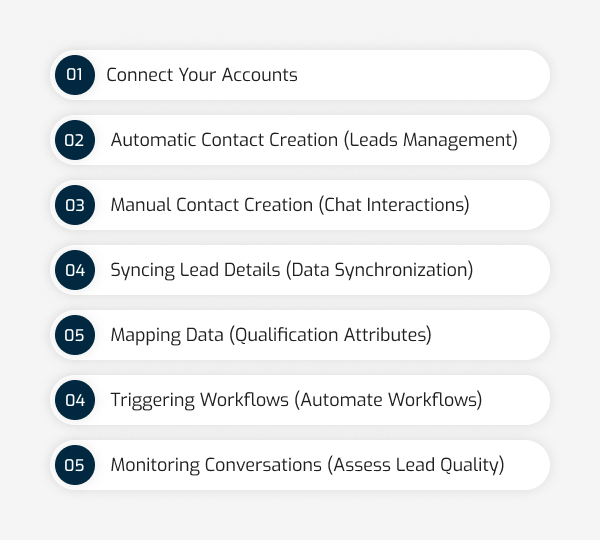
We’ve laid out a simple, 7-step process for Intercom and HubSpot integration. From connecting your accounts to monitoring lead quality, read this guide to help you turn your HubSpot live chat integration into a growth engine. Let’s dive into the setup and get your tools working in harmony.
Is your sales team experiencing complications in catering to customer queries in surge hours? Is this affecting your query repetition and retention rate? Don’t worry, you’re not alone in this journey. Many organisations are experiencing this challenge because of not having an integrated customer support system to cater to every customer. This is where the need for an integrated system – HubSpot Intercom Integration steps in.
With Intercom services, you can give your customers exceptional customer satisfaction. It enables businesses to effectively manage customer interactions and streamline workflows, ensuring sales reps cater to every lead.
In fact, Survicate research reveals that more than 92% of customers are likely to repeat purchases after experiencing positive customer satisfaction. And it’s no surprise that over half of customers switch to a competitor after an unsatisfactory experience.
The lack of connections between support and CRM solutions causes issues that affect bottom-line profits. Sales staff lacks context, support professionals do not have access to insights, and marketers are deprived of behavioral data useful for nurturing activities.
This is where Intercom CRM integration helps change the dynamics of the workflow.
With HubSpot and Intercom integration, businesses will be able to:
– Unify customer communications and CRM contacts.
– Enhance response times during peak hours.
– Automate leads generation and qualification processes
– Activate workflows in response to chat activity
– Tailor follow-ups based on communication history
– Boost collaboration across departments
As shown by multiple customer experience research projects, companies providing faster and more personalized customer service enjoy higher retention and repurchase rates.
Before moving into the integration setup, it is worth understanding what the investment looks like, because Intercom pricing varies based on the features, seat count, and support tier your team actually needs, and choosing the right plan upfront ensures you are not paying for features that you will not use or missing the ones that matter most to your workflow.
Understanding HubSpot Intercom Integration
HubSpot is a robust CRM and gives an entire suite for sales, marketing, and customer service. Intercom is an AI-first omnichannel customer service tool that empowers sales representatives to connect to customers with live chat, messaging as well as email. Through this, an excellent synergy is obtained as these two platforms are amalgamated together and allow a company to unlock a new series of benefits to transform interactions across all touchpoints; including:
#1. Unify customer data: This integration centralise customer information in one place, so you can access, use, and ensure a 360-degree view of data.
#2. Automated workflows: You can set up automated replies to the most frequently asked questions for instant response, saving time.
#3. Enhance customer experience: Intercom integration with HubSpot ensures that every customer gets an instant response with the most appropriate solutions they require. Also, you can provide seamless and personalised customer support for an efficient experience.
#4. Improve lead generation and sales: This integration ensures that every lead is entertained, increasing the chances of converting more leads into customers with efficient follow-ups
Step-by-Step Guide to Integrate Intercom with HubSpot
To access the Intercom features within HubSpot, you need to follow some steps to integrate both platforms and sync data for exceptional results.
Step 1. Connect Your Accounts
You need to access the Intercom App Store to install the HubSpot app and begin your integration process. Follow the prompt to connect your HubSpot account to Intercom. After installation, enable the HubSpot account to access Intercom leads and conversations within the platform automatically or manually.
You need to enable the automatic contact creation to feature in Intercom settings to automatically create contacts in HubSpot following the conversation transcripts. These leads and user conversation transcripts will automatically appear as activities in HubSpot. Additionally, helping you with invaluable insights into customer needs and preferences.
You can create contacts manually within HubSpot app for specific chat interactions that require personalised follow-ups. Not only this, but you can check the email, name, life stage, company name, and add-on details of the created contact to tailor your communication and improve engagement effortlessly.
Step 4. Syncing Lead Details (Data Synchronization)
Following the above step, you can automatically send or sync qualified leads within HubSpot. If you update any detail in Intercom, the same information updates will apply inside HubSpot, allowing you to enrich customers in HubSpot with Intercom as a conversion point.
You can find this by going to App Store > HubSpot > Settings and opening Map data sent to HubSpot. From here, you can select a HubSpot contact attribute for each of your qualification attributes in Intercom.
This Intercom and HubSpot integration keep your lead information, including email, first and last names, contact, and company name updated, ensuring optimisation around all your marketing initiatives.
Step 5: Mapping Data (Qualification Attributes)
You’ll find that the data or custom fields you mapped from Intercom are directly sent to HubSpot, so your data will be accurately synchronised. This allows you to further segment your audience and deliver the right marketing messages. Finally, owners are only synced when a contact is created and not when the contact or owner is updated.
Step 6: Triggering Workflows (Automate Workflows)
Create triggers in HubSpot based on specific events in an Intercom conversation. This HubSpot and intercom integration enhances lead nurturing through automatic follow-up emails, tasks, and other workflows. You can use any part of the Intercom conversation as your trigger, including,
The date it occurred
Keywords contained in the conversation’s transcript
The conversation’s URL
Step 7: Monitoring Conversations (Assess Lead Quality)
You can track conversations in HubSpot to measure lead quality and identify potential opportunities. An analysis of conversation data may help you refine your sales and marketing strategies to better convert leads.
In a Nutshell,
By following the discussed steps above and leveraging the power of Intercom HubSpot integration, you can unlock the unmatched features of both platforms.
Manually performing this may cause complexity and require expert expertise to address and handle. This is where the need for HubSpot experts or consultants comes into the pitchure. TransFunnel is one such name in the B2B landscape, a HubSpot Gold partner that specializes in implementing and integrating third-party tools and platforms. Also, being recognised as Intercom partners, they ensure a smooth HubSpot Intercom Integration while assuring that you’ll be able to significantly enhance customer communication, streamline workflows, and drive business growth.
So, what stopping you from making the most out of HubSpot Intercom Integration? Let’s not initial investment be the hurdle to unlocking a suite of features. Consult, select, purchase, and leverage the HubSpot Intercom with us! Book your consultation today!